Welcome to James Brown's blagoblag! This contains various thoughts and opinions, mostly wrong,
going back a couple of decades. All of the opinions are my own, and probably not my employer's. Feel free to visit the
about page for more useless interesting facts about me.
I've had Apple Watches for quite a few years[1], and I gotta say that watchOS 27 is probably the most disruptive release so far. If you haven't upgraded yet, my advice is: don't.
The big problem is Siri. Voice recognition is obviously the main user interface on a 1"-wide display, The new Siri[2] is dog-slow, even on a brand-new Series 12 watch, which other plenty of other people have noted. I assume they'll do something about that (maybe just go back to the pre-LLM Siri for the watch). However, the thing that really kills me is that tilting your wrist at all now dismisses Siri right away. I've always used the watch by raising it to my face, saying "Hey Siri, add bananas to my grocery list"[3], and then putting my wrist down while the teeny tiny watch CPU figures out what I said. On watchOS 27, as soon as I put my wrist down, the interaction is silently canceled.
The watch also re-springs every few hours, but, you know, that's life with a .0 OS.
It's a shame, because I actually like the new app launcher and some of the other changes. Maybe 27.2 will be better!
Basically since I switched away from my Pebble Time Round in 2018 or so. The Pebble was pretty nice, although Eric Migicovsky seems like a weird guy and I'm just waiting for whatever news comes out that he, I dunno, eats babies or something. All the tech CEOs always turn out to be awful. ↩
Just a brief note - Pulse N Pause Coffee has been doing pop-ups at Paper Son in SF on and off for the last couple of weeks and I legitimately think it's the best coffee I've ever had. If you get a chance to try some, I recommend it!
I did promise "something more cheerful" yesterday, right?
You know the one: Nobody's saying you have to use 'AI', but you really should experiment with frontier models. Almost everyone else on the team loves them. They're inevitable! Surely this will be the last job you'll ever have where chatbots aren't mandatory. Even if you aren't going to use them, at least stop complaining when people send you obviously-vibe-coded long 'AI-assisted' PRs.
Everyone here should already know my stance on these things, but just because it makes me feel better, I'm going to write it down again: other people think that LLMs are "cool" or that they "improve engineering velocity". I think they've evil. These aren't positions with a middle ground between them.
Are unethical in their construction; they were trained by stealing the entire corpus of human work and feeding it into a statistical engine. Aaron Schwartz died because of copyright law not 15 years ago, but when Sam Altman does something 100x worse, we're supposed to just shrug, take a pittance of a settlement and move on?
Are unethical in their execution. Doing inference requires enormous, beefy
computers and large "agentic" workflows typically use between 10x and 100x as much power as "normal" computer operations; a single "one-shot" in a cutting-edge model in Claude Code can easily consume hundreds of watt-hours. Beyond that, training uses at least several orders of magnitude more power[2]. And, of course, all of this is happening in "neo-clouds", powered by the dirtiest possible gas turbines and enriching the worstmen alive.
Are unethical in their goals. The most likely[3] outcome of the rapid rollout of LLMs to white-collar jobs can best be described as "what if we could do to white-collar jobs what globalization in the 80's and 90's did to blue-collar jobs?" Business use of LLMs promises to replace high-quality, high-cost, context-aware skilled labor with cheap, mostly-unskilled labor driving a pseudorandom statistical text processing engine. I'm most exposed to this in the workplace, but the evidence is pretty bad for the impact of LLMs on education, too.
None of this has anything to do with whether LLMs increase some business metric like "time to first powerpoint presentation" or "number of UI features shipped per quarter"[4].
It doesn't even have anything to do with whether or not LLMs are an interesting technology.
They're just bad. They way they were built is bad, the way they run is bad, and the outcomes for the world are bad.
This isn't the first technology I've felt this way about.
More than a few times over the last 10 years I've had to walk away from companies or job offers because they were using cryptocurrencies, which I similarly think is technically somewhat interesting, but also evil and bad for the world.
The rhetoric is even similar — 10 years ago, you had people saying that Bitcoin would be the world's reserve currency by 2020, and that anyone who didn't get on board would be left in the poor house when it went "to the moon"; hell, Jack Dorsey renamed Square to Block in 2021 because of how much he thought blockchain technology was going to change the world.
Surely everyone has something that Big Business loves that forms a line they won't cross; maybe it's all the way down at "slave labor" for you, but there's got to be some point where you're willing to engage the moral centers of your brain, right? Nobody actually reaches the fully-nihilistic pit that Linus seems to be stuck in where ethics are a purely-personal matter and don't exist in software projects?
Anyway, I'm hopeful that this hype cycle will pass, too. We probably won't go back to where we were, but maybe we'll go somewhere where I need to have The Talk a little bit less often. Or at least maybe I'll come up with something more cheerful for my next post.
I try not to use the terms "AI" or "Artificial Intelligence" because I think they tend to lead people to anthropomorphizing the technology. Obviously large language models are using what would (in academia) be called AI or ML techniques, like reinforcement learning and neural networks, and obviously they're able to generate prose that for many casual observers passes the Turing Test, but equally-obviously they're not operating in any way that could plausibly be confused with conscious, sentient beings, so I find it's best to avoid the loaded term of "intelligence". ↩
I'll reiterate, separately from the rest of my argument, that the output of LLMs really is not very good. I'll let you know when I can go a few days without seeing an LLM make obvious category errors (which, of course, because LLMs have no qualia and no actual understanding of the world, are just expected outputs). LLM-generated prose is absolutely horrible to read and it's now at the point where I have to close multiple articles a day because they're unreadable, obvious slop. LLM-generated code is verbose and mediocre, the kind of thing that we used to make fun of "Java programmers" for writing. ↩
I just finished updating this site from Zola0.22.0 to 0.23.2.
It doesn't seem like this should be a big deal, but it turns out that Zola 0.23 ported the templating engine from Tera 1 to Tera 2.
The biggest change in Tera 2 is the replacement of macros by hygenic function-like "components" which, to put it lightly, fucked my shit up.
I have a bunch of templates that make this site more pleasant; for example, if I want to insert an image I used to use a Zola shortcode called "figure" that I wrote:
{% if src is starting_with("http") %}{% set url=src %}{% elif src is starting_with("/") %}{% set url=src %}{% elif page %}{% set url=get_url(path=page.path ~ src) %}{% else %}{% set url=get_url(path=section.path ~ src) %}{% endif %}{% if self_href %}{% set href = url %}{% endif %}{% if thumbnail %}{% set resized = resize_image(path=page.colocated_path ~ src, width=800, height=800, op="fit") %}{% set url = resized.url %}{% endif %}<figure> {% if href %} <a href="{{href | safe}}"> {% endif %} <img src="{{url | safe}}" {% if classes %}class="{{classes}}" {% endif %}{%if alt %}alt="{{alt}}" {%endif%} /> {% if href %} </a> {% endif %} <figcaption>{{caption | markdown(inline=true) | safe}}</figcaption></figure>
This was called like {{figure(src="foo.png", caption="Whatever", thumbnail=true)}} and would figure out the right source for the image.
The replacement component looks like
{% component blog.figure(src: string, caption: string, alt: string = "", self_href: bool = false, thumbnail: bool = false, page: map = {}, section: map = {}) %} {% if src is starting_with(pat="http") %} {% set url=src %} {% elif src is starting_with(pat="/") %} {% set url=src %} {% elif page %} {% set url=get_url(path=page.path ~ src) %} {% else %} {% set url=get_url(path=section.path ~ src) %} {% endif %} {% if self_href %} {% set href = url %} {% endif %} {% if thumbnail %} {% set resized = resize_image(path=page.colocated_path ~ src, width=800, height=800, op="fit") %} {% set url = resized.url %} {% endif %}<figure>{% if href %}<a href="{{href | safe}}">{% endif %}<img src="{{url | safe}}" {% if classes %}class="{{classes}}" {% endif %}{%if alt %}alt="{{alt}}" {%endif%} />{% if href %}</a>{% endif %}<figcaption>{{caption | markdown(inline=true) | safe}}</figcaption></figure>{% endcomponent %}
You use this as {{<blog.figure src="foo.png" caption="whatever" thumbnail={true} page />}}
A couple of important changes:
The page / section global needs to be passed in explicitly now because there's no way to reference globals any more (I filed getzola/zola#3223 about this)
You can't indent any more, because components run before markdown processing, so they have to output valid markdown (which means any inline HTML needs to be un-indented; I filed getzola/zola#3224 about this)
The new fake-HTML syntax really screws up syntax highlighting and has a totally unnecessary JSX-style curly-bracket wrapping of non-text values (even though you also need to quote string values, so, again, this serves no purpose).
Another change that's in Zola 0.23 that drove me a bit mad is that the group_by filter now outputs an unsorted hash map instead of a sorted map, and the workaround is gross and requires using {% set_global %}. Hoping that upstream adds the ability to sort maps at some point (or just switches to a BTreeMap instead of a HashMap).
Anyhow, it took me about an hour to port everything over and there are almost certainly some screwy pages still on the site. Drop me a line if you notice any!
Cross-posting a security advisory I wrote up at work. The actual mechanics of the issue
are kind of boring, but I found some interesting stuff to work on in it anyway!
Yesterday, a former coworker reached out to ask if I had a copy of a piece of software that we'd open-sourced at easypost, which
he couldn't find. I investigated and found out that not only was that repository mysteriously deleted, but a bunch of the things we open-sourced there.
This comes about a year after I learned that all of the engineering blog posts had been deleted and the entire corporate blog was just obvious low-quality
AI SEO slop now.
Look, I recognize that that corporations aren't your friends, unless it's written in a contract somewhere it doesn't exist, and yadda yadda.
JFC, though – if you are in any position of power at a software company, don't do this!
Your employees give you their 40[1] hours a week because they get paid for it. If you want them to put in the extra effort and
write blog posts[2] or write open-source software that boosts your standing in the community? You'd better not goddamn delete it with no notice a couple
of years later. If you really can't afford the $0/repo it costs to host something on Github, then reach out to the original authors and let them take it
over. This isn't just bad stewardship, it's the worst kind of shortsightedness[3]. The implied social contract is that when employees produce
extracurricular public content for you, you keep it around to be part of their portfolio.
Anyhow, if you were looking for it, ferrous-socks is back online with the latest clone I had, and even with some
new fixes and updates. I hope it brings someone out there some value or joy.
In this industry, more often 50 or 60, plus 24/7 on-call coverage ↩
Especially high-quality ones that multiple candidates will cite during interviews ↩
A few people I've talked to have suggested that the executive team has succumbed to AI psychosis and believes that they don't need to try
to hire/retain software engineers any more, because LLMs are going to take over the world or something. I guess I can imagine what that means for my stock value... ↩
Back when I used Linux on the desktop,
I used to use this great window manager called "awesome".
It's probably the thing I've missed the most since switching to macOS,
especially when on small screens like the 14" display of this MacBook
I'm typing on. Awesome was what is known as a "tiling window manager".
This means that rather than having a bunch of windows overlapping on some number of virtual desktops, windows are arranged into nonoverlapping segments called "tiles".
Tiling window managers have been around for a long time; Windows 1.0[1] was a tiling window manager and competed with the overlapping-window desktop metaphor of the original Macintosh OS[2].
Tiling window managers require a lot of persnicketey window management to be useful (because otherwise you just end up with a bunch of unusably-tiny rectangles vanishing into the distance), but if you're willing to put up with it they can give you a super-fast way to organize and manage your applications.
Tiling window managers often lean heavily onto the concept of "virtual desktops", allowing you to quickly switch between different sets of windows.
Macintosh windowing isn't bad. The original concept[3] of overlapping windows whose order can be micromanaged is a great way to scale from one to several windows.
Mac OS X 10.5 Leopard added a virtual desktop feature called "Spaces" that isn't terrible (especially once you add the "Displays have separate Spaces" option), but the animations are insufferably long and keyboard accessibility is pretty limited.
Anyhow, it turns out that nowadays, there are a few options for tiling window managers on macOS. The top few seem to be
yashiki looks cool (and is actually very close to the design of awesome), but it appears to be heavily "vibe-coded" and I wasn't able to get it to work.
rift also looks cool, but crashed Dock.app when I tested it
I played with them all, but for the last week or so I've been using AeroSpace exclusively.
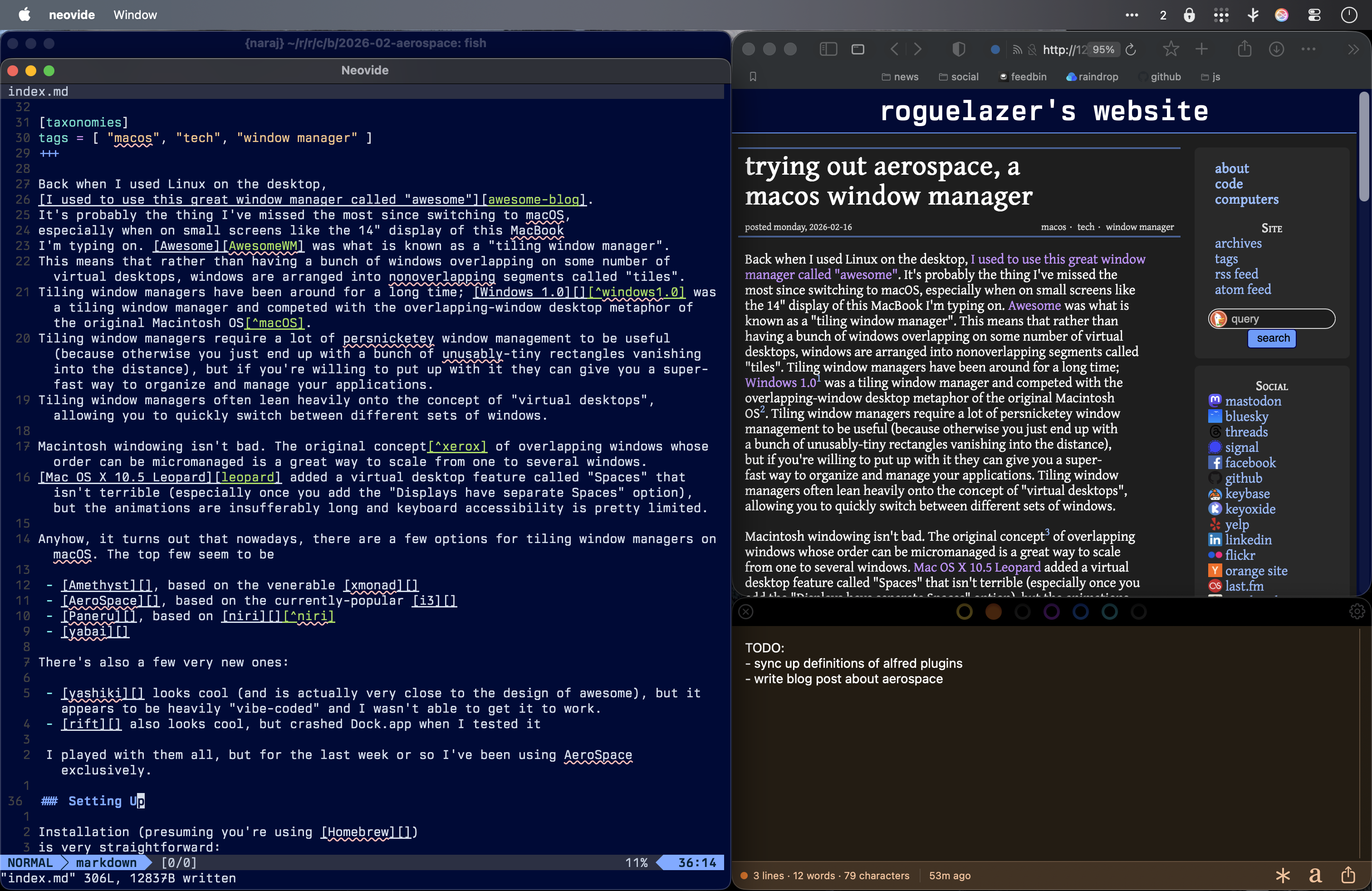
My desktop right now under AeroSpace showing several windows in an accordion on the left and two windows tiled on the right
Installation (presuming you're using Homebrew)
is very straightforward:
brew install --cask nikitabobko/tap/aerospace
You'll have to go to System Settings → Privacy & Security → Accessibility and add both /Applications/AeroSpace.app. At this point they can control your whole computer, so, uh, here's hoping they aren't malware.
AeroSpace is configured via a TOML file at ~/.aerospace.toml.
config-version = 2# You can use it to add commands that run after AeroSpace startup.# Available commands : https://nikitabobko.github.io/AeroSpace/commandsafter-startup-command = []start-at-login = true# Normalizations. See: https://nikitabobko.github.io/AeroSpace/guide#normalizationenable-normalization-flatten-containers = trueenable-normalization-opposite-orientation-for-nested-containers = true# See: https://nikitabobko.github.io/AeroSpace/guide#layouts# The 'accordion-padding' specifies the size of accordion padding# You can set 0 to disable the padding featureaccordion-padding = 30# Possible values: tiles|accordiondefault-root-container-layout = 'tiles'# Possible values: horizontal|vertical|auto# 'auto' means: wide monitor (anything wider than high) gets horizontal orientation,# tall monitor (anything higher than wide) gets vertical orientationdefault-root-container-orientation = 'auto'# Mouse follows focus when focused monitor changes# Drop it from your config, if you don't like this behavior# See https://nikitabobko.github.io/AeroSpace/guide#on-focus-changed-callbacks# See https://nikitabobko.github.io/AeroSpace/commands#move-mouse# Fallback value (if you omit the key): on-focused-monitor-changed = []on-focused-monitor-changed = ['move-mouse monitor-lazy-center']# Also see: https://nikitabobko.github.io/AeroSpace/goodies#disable-hide-appautomatically-unhide-macos-hidden-apps = false# List of workspaces that should stay alive even when they contain no windows,# even when they are invisible.# This config version is only available since 'config-version = 2'# Fallback value (if you omit the key): persistent-workspaces = []persistent-workspaces = ["1", "2", "3", "4", "5", "6", "7", "8", "9", "Z"]# A callback that runs every time binding mode changes# See: https://nikitabobko.github.io/AeroSpace/guide#binding-modes# See: https://nikitabobko.github.io/AeroSpace/commands#modeon-mode-changed = []# Possible values: (qwerty|dvorak|colemak)# See https://nikitabobko.github.io/AeroSpace/guide#key-mapping[key-mapping] preset = 'qwerty'# Gaps between windows (inner-*) and between monitor edges (outer-*).# Possible values:# - Constant: gaps.outer.top = 8# - Per monitor: gaps.outer.top = [{ monitor.main = 16 }, { monitor."some-pattern" = 32 }, 24]# In this example, 24 is a default value when there is no match.# Monitor pattern is the same as for 'workspace-to-monitor-force-assignment'.# See:# https://nikitabobko.github.io/AeroSpace/guide#assign-workspaces-to-monitors[gaps] inner.horizontal = 0 inner.vertical = 0 outer.left = 0 outer.bottom = 0 outer.top = 0 outer.right = 0# 'main' binding mode declaration# See: https://nikitabobko.github.io/AeroSpace/guide#binding-modes# 'main' binding mode must be always presented# Fallback value (if you omit the key): mode.main.binding = {}[mode.main.binding] # All possible keys: # - Letters. a, b, c, ..., z # - Numbers. 0, 1, 2, ..., 9 # - Keypad numbers. keypad0, keypad1, keypad2, ..., keypad9 # - F-keys. f1, f2, ..., f20 # - Special keys. minus, equal, period, comma, slash, backslash, quote, semicolon, # backtick, leftSquareBracket, rightSquareBracket, space, enter, esc, # backspace, tab, pageUp, pageDown, home, end, forwardDelete, # sectionSign (ISO keyboards only, european keyboards only) # - Keypad special. keypadClear, keypadDecimalMark, keypadDivide, keypadEnter, keypadEqual, # keypadMinus, keypadMultiply, keypadPlus # - Arrows. left, down, up, right # All possible modifiers: cmd, alt, ctrl, shift # All possible commands: https://nikitabobko.github.io/AeroSpace/commands # See: https://nikitabobko.github.io/AeroSpace/commands#layout alt-slash = 'layout tiles horizontal vertical' alt-comma = 'layout accordion horizontal vertical' # See: https://nikitabobko.github.io/AeroSpace/commands#focus alt-h = 'focus --boundaries-action wrap-around-the-workspace left' alt-j = 'focus --boundaries-action wrap-around-the-workspace down' alt-k = 'focus --boundaries-action wrap-around-the-workspace up' alt-l = 'focus --boundaries-action wrap-around-the-workspace right' alt-q = 'focus-monitor left' alt-e = 'focus-monitor right' # See: https://nikitabobko.github.io/AeroSpace/commands#move alt-shift-h = 'move left' alt-shift-j = 'move down' alt-shift-k = 'move up' alt-shift-l = 'move right' # See: https://nikitabobko.github.io/AeroSpace/commands#resize alt-minus = 'resize smart -50' alt-equal = 'resize smart +50' # See: https://nikitabobko.github.io/AeroSpace/commands#workspace ctrl-1 = 'workspace 1' ctrl-2 = 'workspace 2' ctrl-3 = 'workspace 3' ctrl-4 = 'workspace 4' ctrl-5 = 'workspace 5' ctrl-6 = 'workspace 6' ctrl-7 = 'workspace 7' ctrl-8 = 'workspace 8' ctrl-9 = 'workspace 9' ctrl-0 = 'workspace Z' ctrl-left = 'workspace prev' ctrl-semicolon = 'workspace prev' ctrl-right = 'workspace next' ctrl-quote = 'workspace next' ctrl-shift-semicolon = 'focus-monitor prev' ctrl-shift-quote = 'focus-monitor next' # See: https://nikitabobko.github.io/AeroSpace/commands#move-node-to-workspace ctrl-shift-1 = 'move-node-to-workspace 1' ctrl-shift-2 = 'move-node-to-workspace 2' ctrl-shift-3 = 'move-node-to-workspace 3' ctrl-shift-4 = 'move-node-to-workspace 4' ctrl-shift-5 = 'move-node-to-workspace 5' ctrl-shift-6 = 'move-node-to-workspace 6' ctrl-shift-7 = 'move-node-to-workspace 7' ctrl-shift-8 = 'move-node-to-workspace 8' ctrl-shift-9 = 'move-node-to-workspace 9' ctrl-shift-0 = 'move-node-to-workspace Z' alt-tab = 'workspace-back-and-forth' alt-shift-tab = 'move-workspace-to-monitor --wrap-around next' alt-space = 'fullscreen' alt-shift-semicolon = 'mode service' ctrl-shift-enter = "exec-and-forget kitty -1 --detach -d $HOME"# 'service' binding mode declaration.# See: https://nikitabobko.github.io/AeroSpace/guide#binding-modes[mode.service.binding] alt-shift-semicolon = 'mode main' esc = ['reload-config', 'exec-and-forget osascript -e "display notification \"aerospace config reloaded\" with title \"aerospace\""', 'mode main'] r = ['flatten-workspace-tree', 'mode main'] # reset layout f = ['layout floating tiling', 'mode main'] # Toggle between floating and tiling layout alt-shift-q = 'move-workspace-to-monitor left' alt-shift-e = 'move-workspace-to-monitor right' alt-shift-h = ['join-with left', 'mode main'] alt-shift-j = ['join-with down', 'mode main'] alt-shift-k = ['join-with up', 'mode main'] alt-shift-l = ['join-with right', 'mode main'][[on-window-detected]] if.app-id = "com.markmcguill.strongbox" run = ['layout floating'][[on-window-detected]] if.app-id = "com.1password.1password" run = ['layout floating'][[on-window-detected]] if.app-id = "com.iconfactory.Tot" run = ['layout floating'][[on-window-detected]] if.app-id = "com.apple.mail" run = ["move-node-to-workspace Z"][[on-window-detected]] if.app-id = "com.apple.MobileSMS" run = ["move-node-to-workspace Z"][[on-window-detected]] if.app-id = "com.gather.GatherV2" run = ["move-node-to-workspace Z"][[on-window-detected]] if.app-id = "com.tinyspeck.slackmacgap" run = ["move-node-to-workspace Z"][[on-window-detected]] if.app-id = "net.shinyfrog.bear" run = ["move-node-to-workspace Z"][[on-window-detected]] if.app-id = "com.mimestream.Mimestream" run = ["move-node-to-workspace Z"]
There are a few useful addons I'd recommend; the first is SwipeAeroSpace, which lets you remap 3- or 4-finger swipes to switch virtual desktops in AeroSpace. If you already use BTT or equivalent, you don't need this.
Install it with
brew install --cask mediosz/tap/swipeaerospace
Then add it to Accessibility in System Settings (just like you did for AeroSpace) and launch the app.
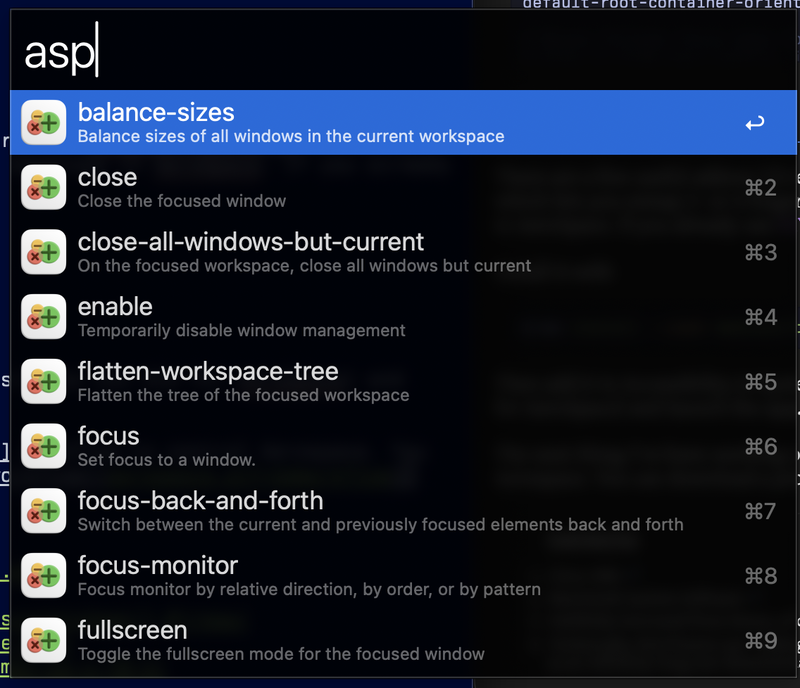
The next thing I've been working on is an Alfred workflow to control Aerospace. You can download a prototype of it at 📁 aerospace.workflow. It supports the new alfred triggers asp to bring up the aerospace command menu, and aw to quickly switch workspaces.
Alfred showing the 'asp' action from this workflow
It's still super-janky, so I haven't published it to the workflow gallery.
A lot of people online use tools like SwiftBar and SketchyBar with these alternate WMs, but I haven't seen any reason to do so yet.
Anyhow, that's where I have it today. Maybe I'll blog some more if this sticks for a few months.
Technically, Niri/Paneru are "sliding" window managers, which represent the desktop as an infinitely-long one-dimensional space that your viewport slides across ↩
Most of the time, when I'm actually doing it, I love my job. There's a reason that computer programming
(or "software engineering" if you're highfalutin) attracts so many people, and it's not just the unsustainably high salaries
at overvalued tech companies or the promise of free gogurt in a corporate cafeteria. I want to take
this post to try and make a case for what makes it so great.
The first aspect I wanted to discuss, which I think is pretty well covered, is that programming is fundamentally
a creative act. Even in the worst slop-house where you're writing boring Java or Go code that converts one form of ProtoBuf to another,
you are making the decisions on how to do that, you are structuring the code,
and you get to enjoy the satisfaction of building something yourself. Creating and building something is one of
the most essential human joys there is, and is essential to human satisfaction[1]. Most of the time,
there's more than one way to do it, and even for the simplest program,
the design space is enormous enough that no two people will come up with the same approach. Exploring this space and deciding
how to tackle a problem is beautiful.
The next aspect that I want to cover is that computers are close to perfect, something that's true in so few other
fields. Computers have ridiculously low error rates[2], and are perfectly deterministic unless you go out of your
way to make them do something pseudorandom. If you write a program correctly, it'll respond the same way every time. Now,
of course, you may still have bugs based on different inputs, or different states of the machine; I'm not trying to say that
we all live in a strongly-typed pure-functional utopia. But compare this to other creative endeavors — no two pieces of wood
that you cut will be the same every time; even if every ingredient looks the same, the dish is always going to be different. But when
you program computers, you have this wonderful opportunity to hone a single project without worrying about variance or materials
degradation.
Finally, and most important to me, everything in computing is knowable. Computer science is a small, shallow field that is
deliberate about building reliable layers of abstractions. There was a blog post going around a few days ago whose conclusion is that,
basically, slopcoding only makes things slightly worse because nobody actually understands the whole stack already. I couldnt't disagree
with this more vociferously. Yes, obviously nobody knows everything! But somebody knows each thing (because these are all systems
built by humans), and the beautiful thing about working on computers is that you can know any thing! I've had times in my career
when I've had to work on kernel interrupt scheduling code; I do have a pretty good idea how
the memory model of ARM processors works; I have built
processors by drawing MOSFETs in Magic. And, yes, I don't know everything listed off
in that blog post, but I know how to learn them if and when I need to. Because my job isn't just to produce widgets of output for some corporate masters;
it's to grow and improve as a person and as at my career, so knowing how to learn new things and improve myself is perhaps the most key skill.
Obviously, this is a post about LLMs, which are pseudorandom lie factories which require their users to do you do the least-creative mind-numbing
activities on the planet[3] and encourage humans to adopt a kind of learned helplessness — to convince us all that the unexamined job is worth working.
Maybe this is the future of my industry, the inevitable enshittification of creative work into a satire-of-a-satire, where former
knowledge workers pull levers on an expensive slot machine until something that they don't understand comes out that meets a Business Need and makes
some executive 0.003% richer, but I damn well hope it's not a future I'll ever participate in.
people keep telling me that there are huge classes of people, called "managers", who get more satisfaction
from ordering someone else to do something than from doing it themselves. This seems like a defect if true, but based
on the general level of dissatisfaction and alcoholism in all the managers I know, I kind of think it isn't true. ↩
although obviously high enough that you can become a prominent computer person by working around them↩
"prompt engineering", a.k.a. trying to randomly guess a series of english words whose highest-probability autocompletion
will be the output you want ↩
I'm trying to get into a habit of reflecting on some good stuff from the past year at the end of the year; I did it last year and the year before, at least. It continues to be hard to get into the mood to think about good
things while the world's burning, jack-booted gestapo are shooting fellow citizens, and my entire industry has been brain-rotted
by the great "AI" scam, but, you know, gotta try to look on the bright side.