Wildflowers
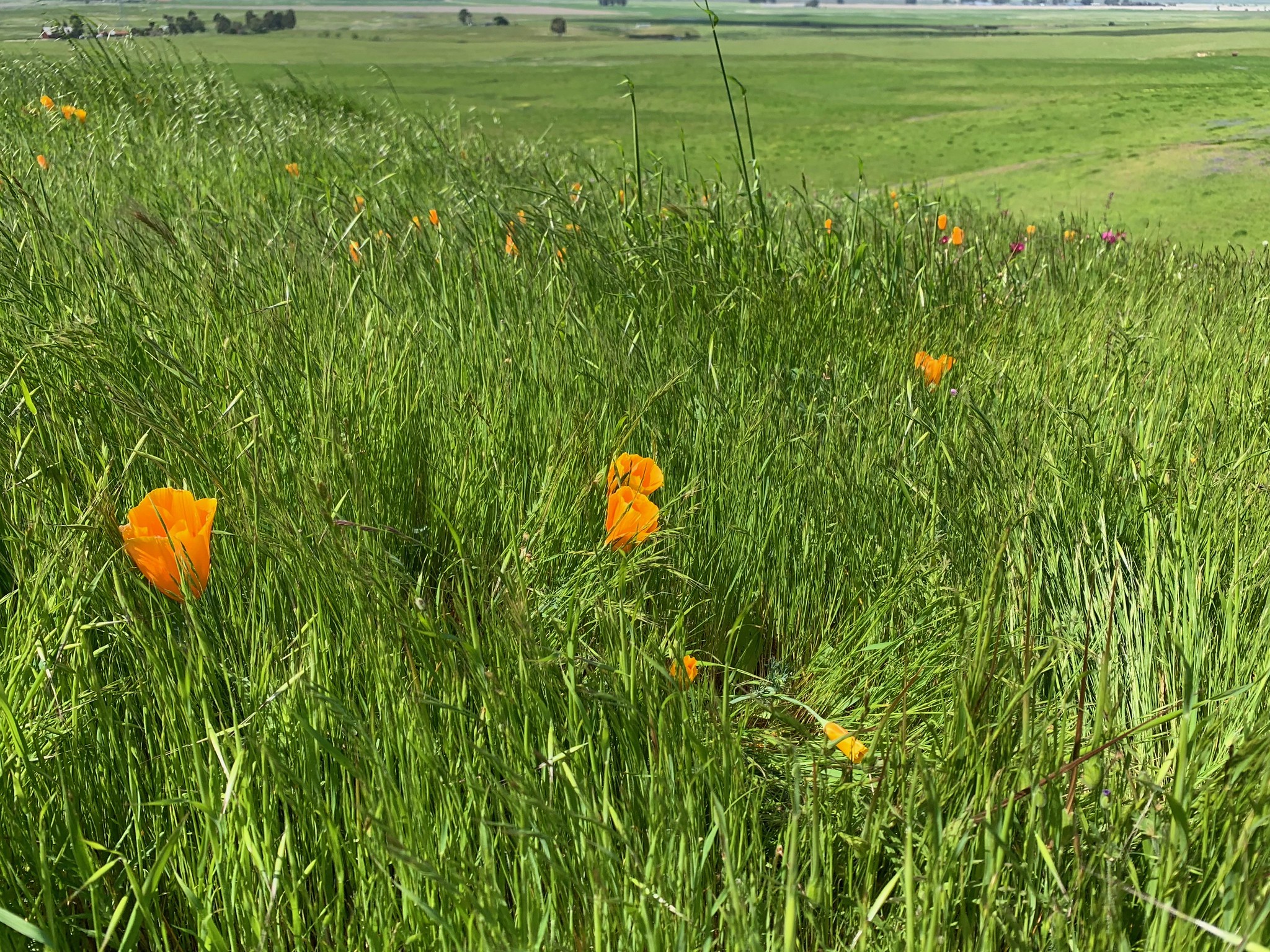
I went up yesterday with my wife's family to hike around on some Sonoma Land Trust property up in the North Bay and brought my camera. It's amazing to see the hills green and growing after so many years of drought! You can see a smattering of photos in this flickr album, but here are some of my favorites:
If you're in Northern California and are physically-able, you should try to get out and enjoy this; it's gorgeous!
Vim Setup: 2019


It's been a little while since I posted about my editor configuration, and I thought I might post what I'm using
now. I guess the most notable change is that (after much prodding from my coworker Drew
Ditthardt) I've switched from Vim to Neovim. Neovim is a vim-compatible editor
written in C and Lua (as opposed to Vim, which is written in C, Vimscript, and prayers). I upgraded to Vim 8 last
year and have had a few too many segmentation faults in the editor, so I decided to switch to something where more
functionality was implemented in a memory-safe language. So far, Neovim has been pretty good to me, although the
new process model means that it's pretty hard to write functions which invoke an external process which takes
interactive input from a user.
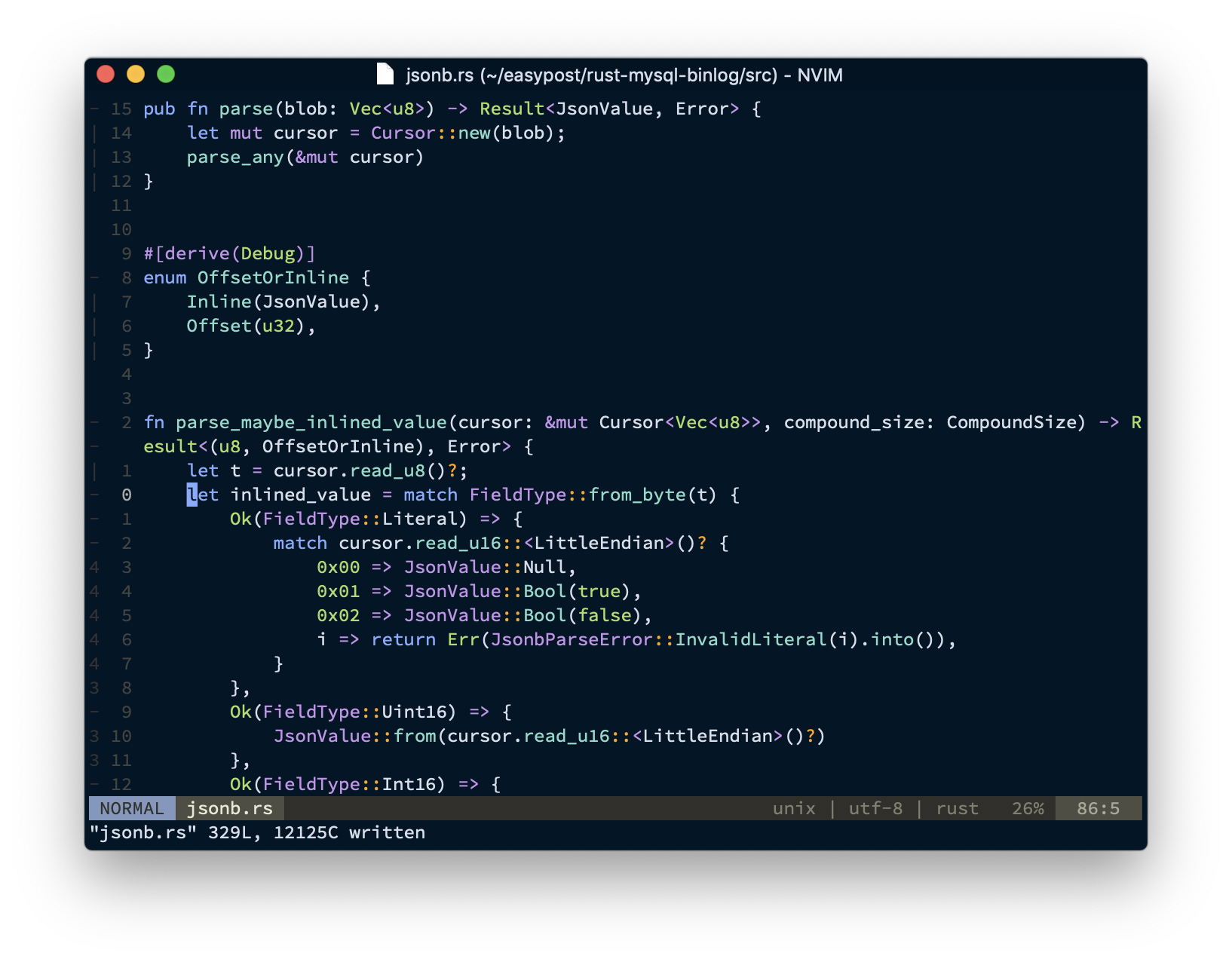
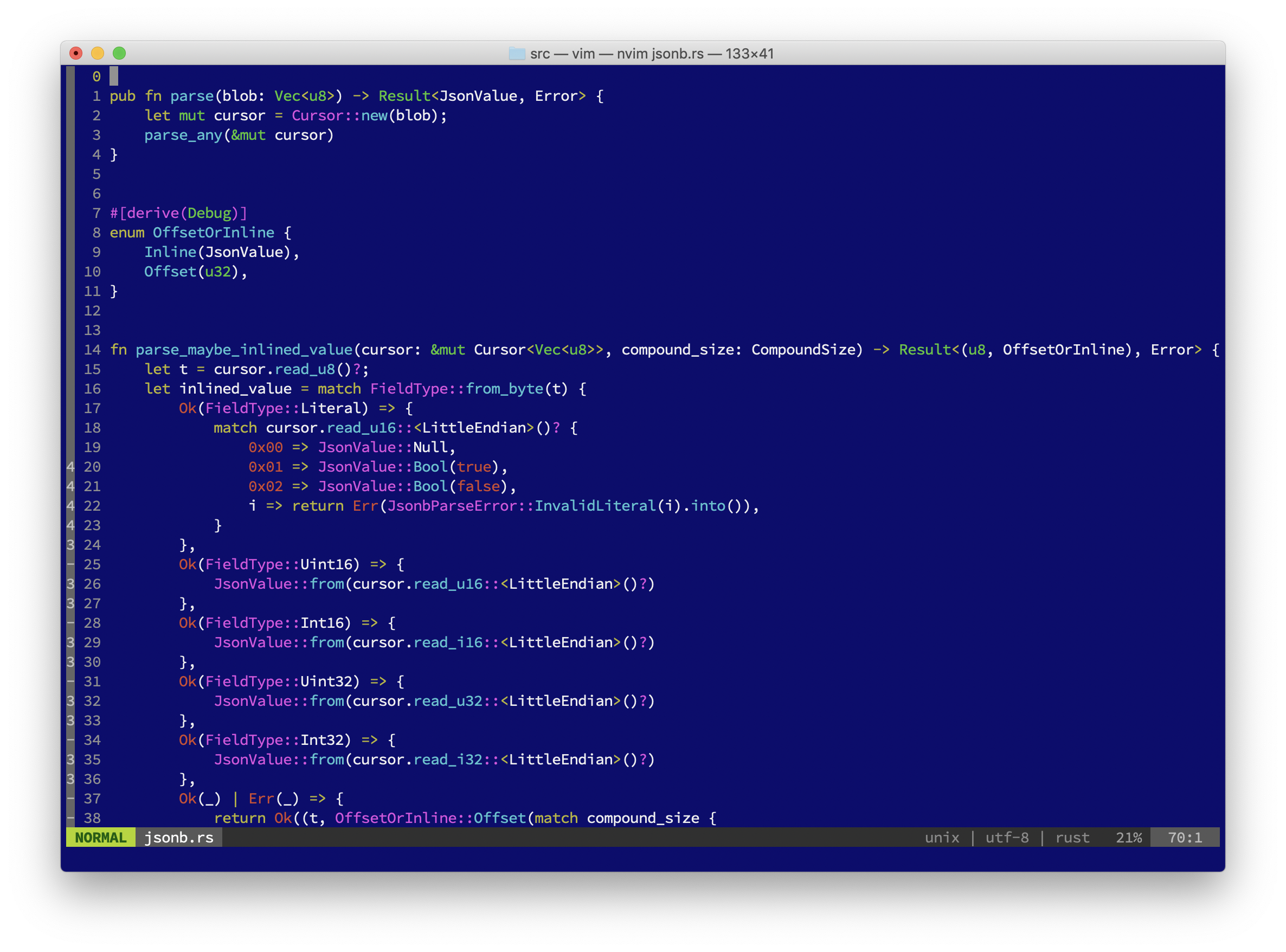
As is probably expected for this sort of thing, here's a couple of screenshots; the first is of VimR, and the second is
from NeoVim in Terminal.app, both editing files from rust-mysql-binlog:
read more
Site Updates
Some minor site updates over the last few days:
- Comments are now powered by Commento instead of Disqus. This
significantly reduces page load size on pages with comments.
- Icons (social media, etc) are all now 2x resolution for modern retina screens.
- Site-specific search is now powered by DuckDuckGo instead of Google. No longer loads an iframe, significantly
faster site-loads, and better privacy to boot.
- Archives page works again. Did this ever work?
- Page is back to being fluid instead of fixed-width.
- Improved CSS across the board, particularly on mobile devices.
- Code page is updated.
I also managed to backport in some blog posts from the 2004-2007 era that were on the Internet Archive. For
posterity!
Feel free to leave a comment or e-mail me if you notice any bugs.
Firefox Setup: 2019
Here's a quick post on how I use and configure Firefox on my Macs. The last time I posted
about any of this was in 2011, and things have
changed a fair bit since then. First, a screenshot (from my new iMac):
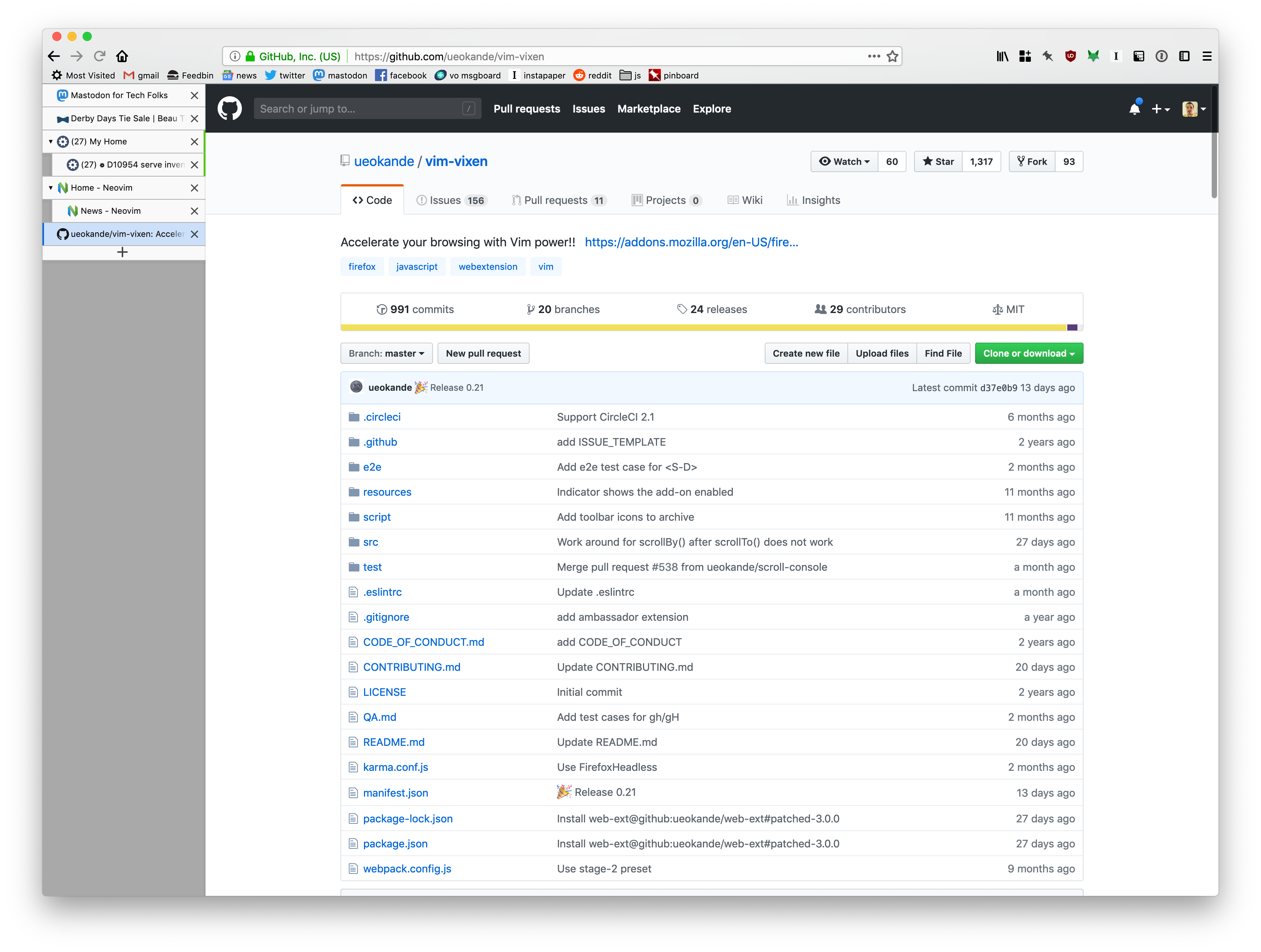
Key extensions for this setup:
- Vim Vixen
- Vim keybindings for Firefox. Not quite as good as Vimperator, but works with modern Firefox, and getting better
all the time. The only thing I really miss is macro recording, which I used all the time in Vimperator.
- Tree-Style Tabs
- Our monitors are widescreen; why would you try to stack tabs at the top of the window, taking up vertical space? Tree-style tabs lets you have a tab-hierarchy in a space-friendly manner.
- uBlock Origin
- I tried to go without an ad-blocker for a few years, to support independent businesses, but it's just not possible. Loading even relatively trustworthy sites (especially, for some reason, webcomics lately) is just a flood of malvertising now. uBlock Origin is the most popular ad-blocker these days. ¯\_(ツ)_/¯
- Multi-Account Containers
- This little extension makes it possible for me to have work tabs alongside personal tabs without corrupting all of my history all of the time. In particular, it lets me map sites (at the domain level) to automatically open in one tab container or another. I wish this supported wildcard domains so I could point every work domain at a container, but it's a start
- New Container Tab
- Adds a keybinding to open a new tab in the same container as the current tab (as opposed to the Firefox default, which opens the "Default", untagged container when you press Cmd-t
- Mac OSX Light
- This just makes the toolbar/titlebar color match the rest of macOS instead of being slightly off. It only works
in "Light Mode".
- 1Password
- Don't leave home without it.
One thing you might've noticed from the screenshot is that I've hidden tabs from the titlebar (since they're in the sidebar), but I don't have a big ugly blank space up there. That trick is actually the driving impetus for this blog post, since every other post on how to do that is broken as of Firefox 64. If you want the exact same appearance I have, just create a chrome/userChrome.css file inside your Firefox profile directory with the following contents:
@namespace url("http://www.mozilla.org/keymaster/gatekeeper/there.is.only.xul");
/* hide the native tabs */
#TabsToolbar .toolbar-items {
	visibility: collapse;
}

/* fix the titlebar color and padding */
.browser-titlebar {
	background-color: var(--toolbar-bgcolor) !important;
	justify-content: space-between !important;
	padding: 8px 0 !important;
	--inactive-titlebar-opacity: 1.0;
}

/* hide the sidebar header so Tree-Style Tabs looks native */
#sidebar-header {
	visibility: collapse;
}

/* Hide the border under where native tabs would be, to get the "unified toolbar" appearance of modern macOS */
#navigator-toolbox {
	--tabs-border-color: transparent !important;
}

/* the coloration of the titlebar to look like a toolbar */
#titlebar {
	background: var(--toolbar-bgcolor);
}

/* hide a single stray vertical line that creeps in if you have tabs hidden */
#titlebar .titlebar-spacer[type="pre-tabs"] {
	border-inline-end: 0 !important;
}
You'll need to restart firefox for it to take effect.
NOTE: You may need to set the toolkit.legacyUserProfileCustomizations.stylesheets to true in about:config to get Firefox
to load userChrome.css.
2019 iMac First Impressions
For the first time since early 2010, I have a desktop computer again!
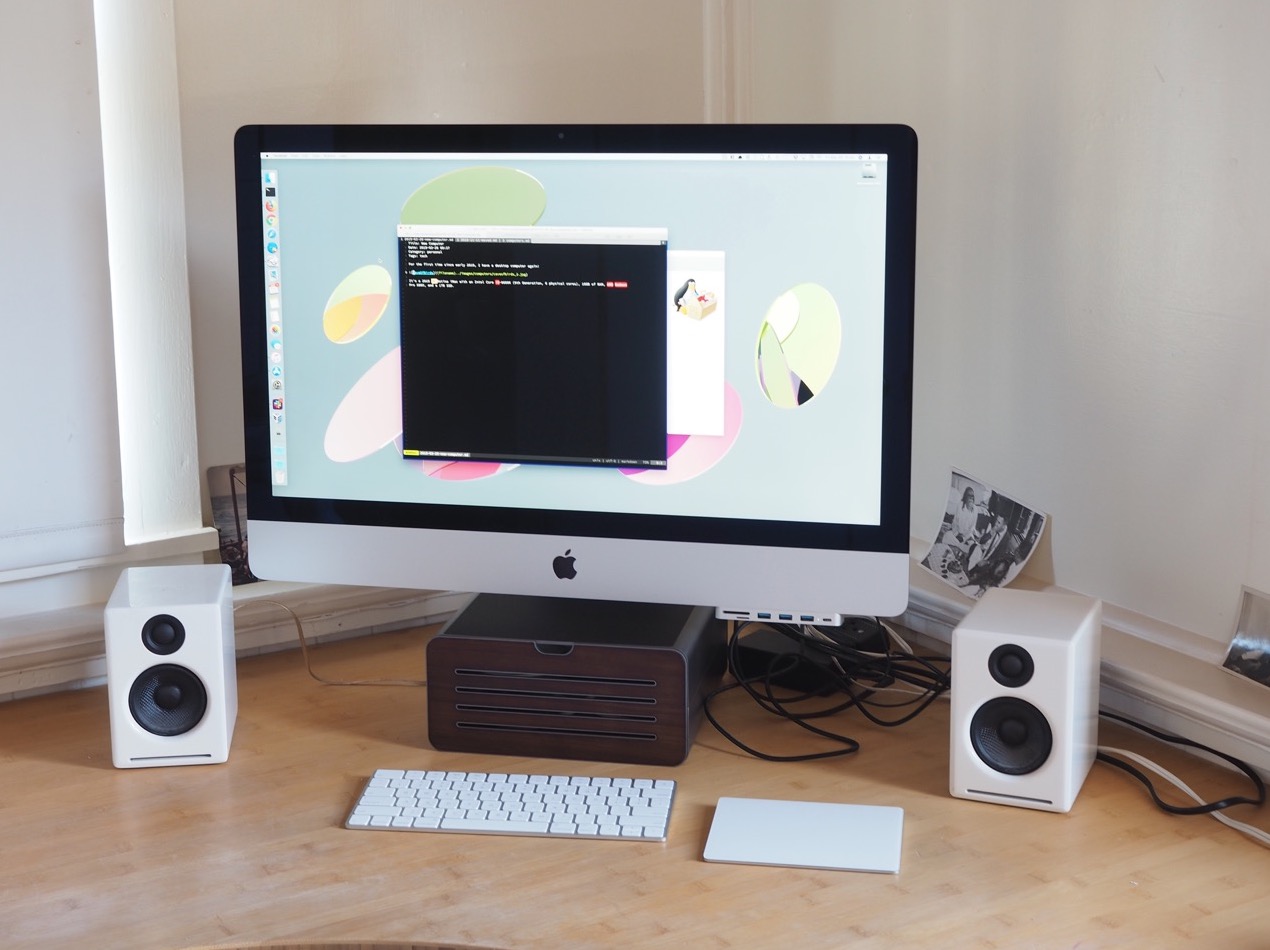
It's a 2019 5K Retina iMac with an Intel Core i5-9600K (9th Generation, 6 physical cores), 16GB of RAM, AMD Radeon
Pro 580X, and a 1TB SSD. Geekbench isn't exactly scientific, but it reports this computer as 50% faster single-core,
150% faster multi-core than the computer it's replacing.
read more
Life Update: Moved
Hello infrequent readers: here's a piece of good news for once: as of October 27th, I've moved! $SPOUSE and I now
live in the Elmwood neighborhood of Berkeley,
California in a nice little two-bedroom one-and-a-half-bedroom
single-family residence. It's a little surreal; even though where we live has a pretty nice mixed-use vibe (there's
an apartment building around the corner, a bunch of restaurants nearby, and a Whole Foods only a few blocks away),
it's still practically rural compared to the apartment in the Tendernob
that I've lived in for the last eight years.
read more
Mastodon
I don't know if you're aware of this, but Twitter hasn't been a very good
company in the last few years. Between the aiding and abetting of white supremacists,
the continued hosting of our obnoxious orange tweeter-in-chief, and the ongoing
user-hostile platform changes, it's just not
as fun of a place as it was when I joined on November 14,
2007. So, uh, I'm not there any more.
No, I didn't delete my Twitter account. However, I have started trying to use a new
microblogging system in its stead: Mastodon. Mastodon is an
interesting idea: it's a federated social network, which means it's made of a bunch of
different copies run by different people but set up so that you can follow people and
read their toots
no matter which instance they happen to be on. I'm on
mastodon.technology, which is generally themed around
mainstream tech stuff, but I follow people at fosstodon and
cybre.space and mastodon.social.
There are a couple of outstanding things about mastodon that I'd like to point out:
- The local timeline is a timeline that shows every toot marked as "public" from people on your instance
If you are on an instance that is relevant to your interests and which isn't too big, this can be a great
way to get exposed to new people and new ideas. Mine has a few too many bitcoin enthusiasts on it, but is generally
fun!
- Instances have rules and a code of conduct. Mastodon.technology (like many other instances) actively blocks
hate speech and white supremacists. How novel!
- You aren't the product! Most instances are either run by volunteers or funded by donations (mastodon.technology
is funded by a Patreon), there are no ads, there's no garbage algorithmic timeline. It's just a chronological list
of short mixed-media posts from people you choose to follow. Again... novel...
Of course, mastodon isn't the first technology product to try to move into Twitter's space. I also used the bizarrely-
named App.net during its brief existence between mid-2013 and mid-2014; it was okay. There was also identi.ca in
2008 and the ever-popular Google Buzz, which I think I used when I was a Google employee 🤷♂️. The real
advantage to Mastodon's design is that since it's open-source software and is federated, it's moderately harder for a
single company to tank the platform. Of course, social networks are only useful as long as people you want to interact
with use them, so it remains to be seen how well-populated Mastodon will be. If you're reading this, maybe you're
someone who would be fun to interact with on Mastodon and you should make an account and follow me? Hm? If you still
want more information, this Motherboard article
is pretty good.
The biggest weakness (for me) for Mastodon so far is a dearth of good native clients. I'm currently using
Amaroq on my iPhone, which is feature complete but
doesn't feel like a very good native iOS app, and beta testing Tusk, which feels
like a native iOS app but is missing lots of features. There's nothing worth using yet on iPads or Macs. However! There
is light at the end of the tunnel — Sean Huber of The
Iconfactory (makers of Twitterrific, the best iOS/macOS Twitter client) appears to be working on a top-secret Mastodon
client named Fantastodon. I'm excited.
So, yeah. If you @-me on Twitter, I probably won't respond, but you should totally join me on Mastodon and
follow me as @roguelazer@mastodon.technology. Awoo!
Election Spam, 2018 ed., Volume 1
Hello intermittent readers, and welcome to the latest edition in my series on electoral advertising. As you may or may
not know, June 5th is California's primary election for 2018. We've got a contentious list of ballot measures, as well
as a variety of local, state, and federal offices up for election, which means it's time for a bunch of special interest
groups to spend money sending my family high-gloss advertising pamphlets.
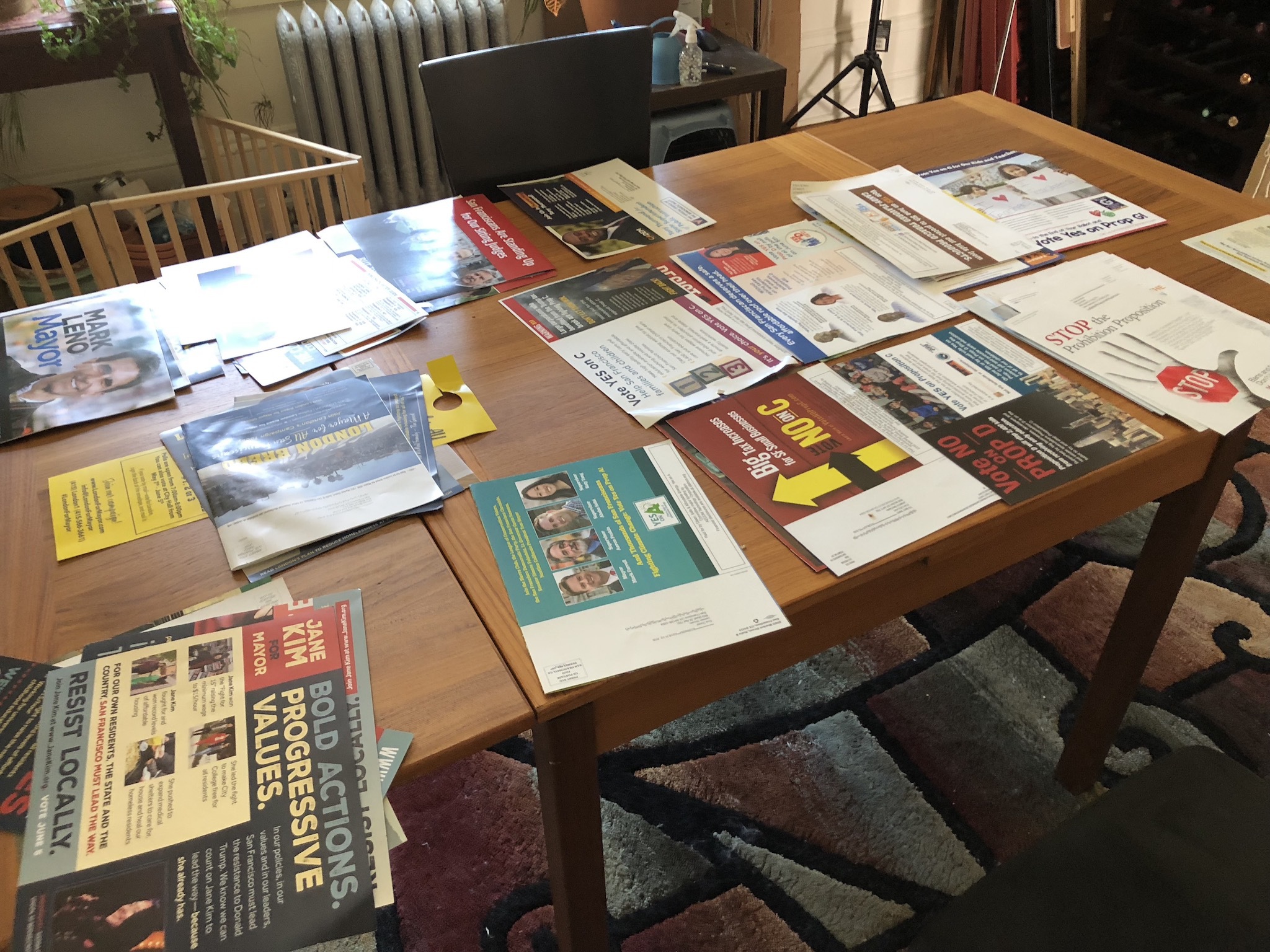
On the ballot this time around:
- Governor
- Lt. Governor
- Secretary of State
- State Controller
- Treasurer
- Attorney General
- Insurance Commissioner
- Board of Equalization
- US Senator
- US Representative
- State Assembly
- Superior Court Judge (x4)
- Superintendent of Public Instruction
- Mayor
- 5 State Measures
- 1 Regional Measure
- 9 City Measures
After the fold, let's see who's spending their advertising budget in densest San Francisco.
read more
Amusing Siri Date Localization Bug
Here's an amusing iOS 11 bug:
If an iOS device is set to the en-US locale and Siri is set to a British voice, when reading dates aloud, Siri transposes months and days. For example, given the command Remind me Wednesday Morning to buy milk
, Siri responds with OK, I added it for Wednesday at 10/11/17 7:00
. When reading this aloud, Siri reads it as OK, I added it for Wednesday the 10th of November two thousand and seventeen at seven o'clock.
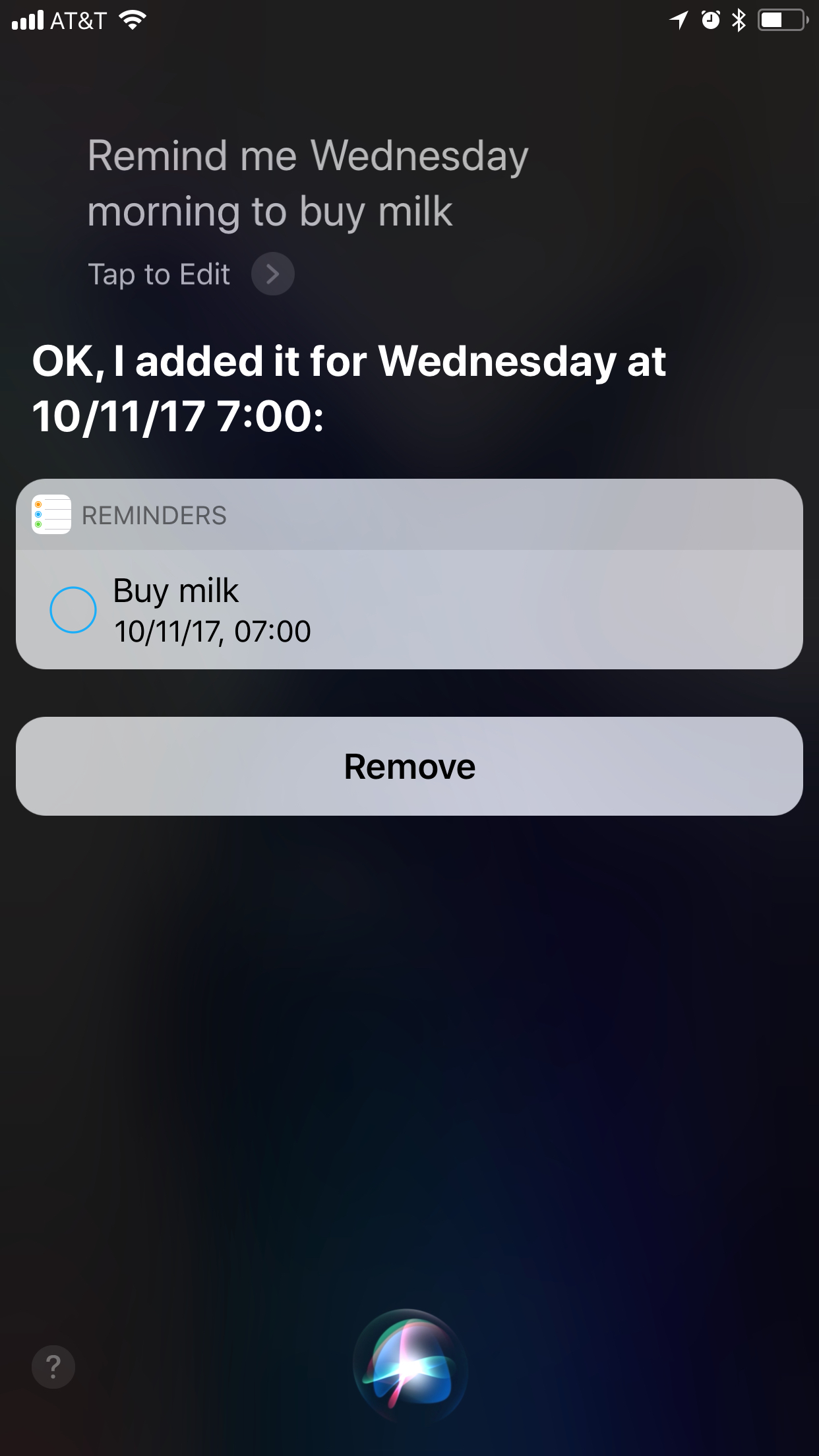
It seems kind of crazy to me the Apple is parsing the raw text shown on screen rather than having some kind of machine-readable tagged data. So weird!
I reported this to Apple. I guess we'll see if it gets fixed in iOS 12.
read more
Gsuite Phishing?
I received an e-mail today at my work address with the subject [Feature Ideas [Customers Only]] - [Survey] The G Suite Admin Experience team wants to learn your needs around data/resource access boundaries
which looked like the following:
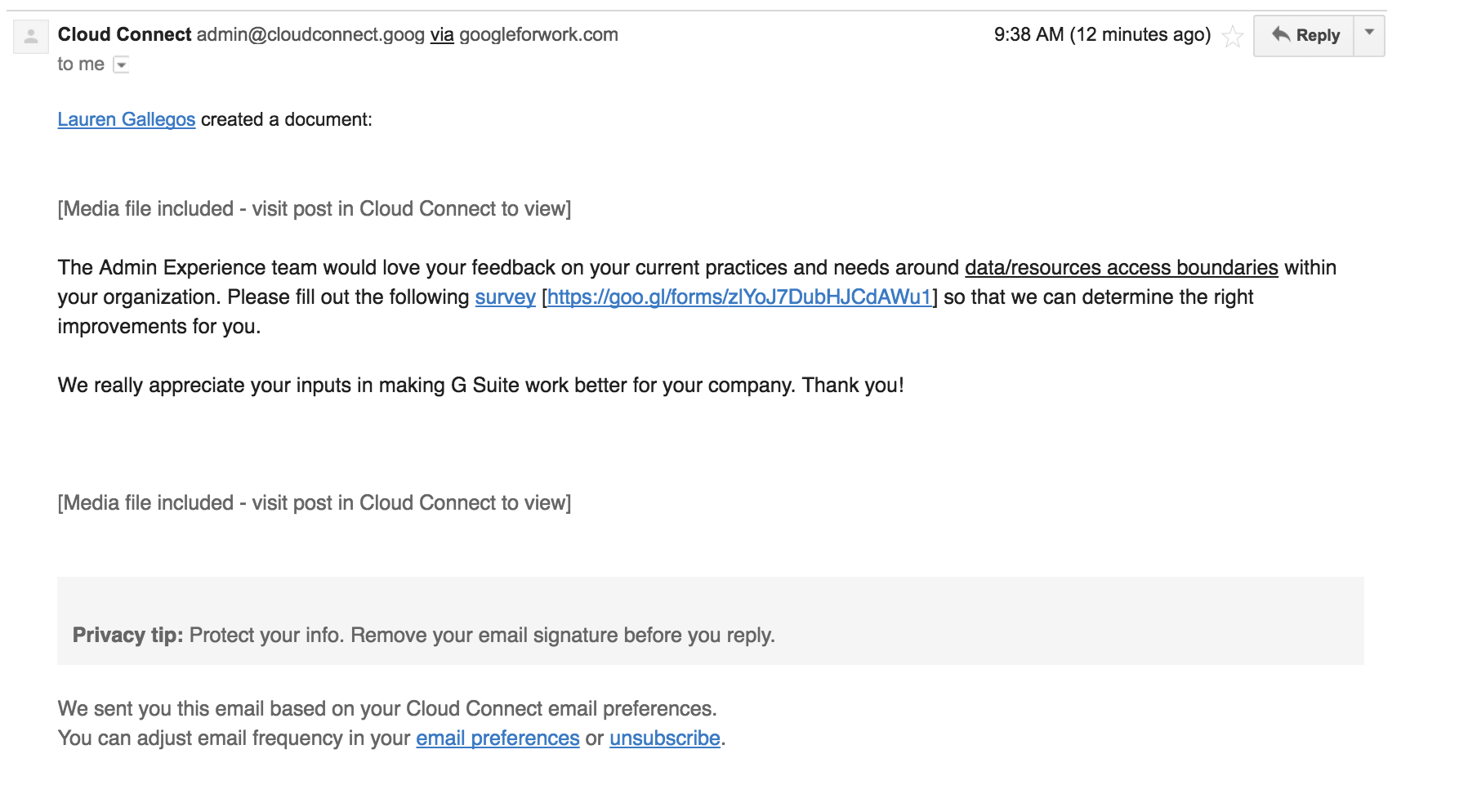
Quick — is this real or is this spam? What would you look for?
read more